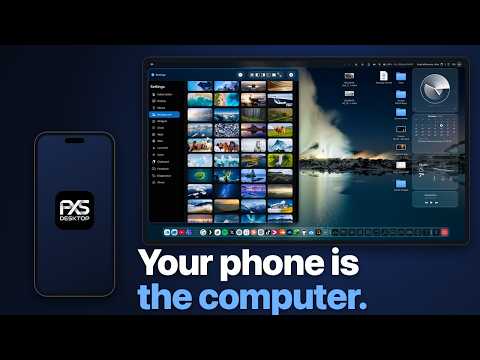

A full desktop that runs on your phone: windows, a dock, a desktop browser, files and apps of its own, on a monitor, a TV, AR glasses or any browser. This is a calm 9-minute tour of PXS Desktop 1.1 for iPhone, recorded straight from the phone's HDMI output.
App Store, free to try: https://apps.apple.com/app/id6756102352
More: https://pxsdesktop.com
Everything you see is drawn by the phone itself. Nothing is streamed from a computer somewhere else. The phone is the touchpad, or you pair a Bluetooth mouse and keyboard.
CHAPTERS
0:00 The desktop
0:13 Settings: resolution, wallpapers and widgets
1:07 A desktop browser, and saving an image
2:00 Your own videos, in windows or full screen
2:28 Notes in Markdown, and Files
2:57 Preview: highlight, sign and date a PDF
4:22 YouTube, full screen or beside your own video
5:31 As many windows as you need
6:01 Overview: every open window at once
6:15 Files: select, copy, paste
6:38 Summarize a document on the phone
6:51 Camera, and scanning paper to PDF
7:21 Clock: six faces, and alarms you set in a sentence
8:04 Calculator: a paper tape, and sums in plain words
8:29 Activity: what the phone is doing
WAYS TO GET A SCREEN
• A cable: a USB-C monitor or portable display, HDMI through an adapter, or AR display glasses (Viture, XREAL, RayNeo, Rokid, Lenovo Legion Glasses)
• Screen Mirroring: an Apple TV, a Mac or an AirPlay 2 TV
• AnyScreen: any modern browser becomes the display
• On an iPad: the desktop on the iPad's own screen
A wired screen needs an iPhone with USB-C (iPhone 15 or later) and a cable that carries video. Charging cables carry power only. Requires iOS 18 or later.
PRICE
Free to download. The free trial starts the first time you connect a screen and gives you three days of use. After that it is one purchase, $39.99 at the launch price (regular $49.99), or a subscription: $24.99 a year or $6.99 a month. US prices. No ads, no account.
THE HONEST LIST
Netflix, HBO Max and Apple TV+ do not play in the browser (their choice, not an iOS limit; Disney+, Prime Video and Plex play fine). Copy and paste works best with a Bluetooth keyboard. A Bluetooth mouse needs a one-time AssistiveTouch setup. The summaries in Preview and Ask in Calculator run on the phone and need an iPhone with Apple Intelligence.
Android version will be out very soon!
More about each app: https://pxsdesktop.com/blog/
Feature requests are voted on in public: https://bytenine.com/apps/pxs-desktop
CREDITS
Photo on the Wikipedia page: "Reine, Lofoten, seen from the top of Reinebringen" by Lukas Beck, CC BY 4.0, via Wikimedia Commons: https://commons.wikimedia.org/wiki/File:Moskenes_Reinebringen_lub_2025-07-21_img09_Aussicht.jpg
Video playing on YouTube: "OVERGROWN - Blender Feature Film (Teaser)" by Blender Studio: https://studio.blender.org/projects/overgrown/
Narration: a synthetic voice, made with ElevenLabs.
PXS Desktop is made by https://byteNine.com. Your phone is the computer.
#PXSDesktop #iPhone #ARglasses
App Store, free to try: https://apps.apple.com/app/id6756102352
More: https://pxsdesktop.com
Everything you see is drawn by the phone itself. Nothing is streamed from a computer somewhere else. The phone is the touchpad, or you pair a Bluetooth mouse and keyboard.
CHAPTERS
0:00 The desktop
0:13 Settings: resolution, wallpapers and widgets
1:07 A desktop browser, and saving an image
2:00 Your own videos, in windows or full screen
2:28 Notes in Markdown, and Files
2:57 Preview: highlight, sign and date a PDF
4:22 YouTube, full screen or beside your own video
5:31 As many windows as you need
6:01 Overview: every open window at once
6:15 Files: select, copy, paste
6:38 Summarize a document on the phone
6:51 Camera, and scanning paper to PDF
7:21 Clock: six faces, and alarms you set in a sentence
8:04 Calculator: a paper tape, and sums in plain words
8:29 Activity: what the phone is doing
WAYS TO GET A SCREEN
• A cable: a USB-C monitor or portable display, HDMI through an adapter, or AR display glasses (Viture, XREAL, RayNeo, Rokid, Lenovo Legion Glasses)
• Screen Mirroring: an Apple TV, a Mac or an AirPlay 2 TV
• AnyScreen: any modern browser becomes the display
• On an iPad: the desktop on the iPad's own screen
A wired screen needs an iPhone with USB-C (iPhone 15 or later) and a cable that carries video. Charging cables carry power only. Requires iOS 18 or later.
PRICE
Free to download. The free trial starts the first time you connect a screen and gives you three days of use. After that it is one purchase, $39.99 at the launch price (regular $49.99), or a subscription: $24.99 a year or $6.99 a month. US prices. No ads, no account.
THE HONEST LIST
Netflix, HBO Max and Apple TV+ do not play in the browser (their choice, not an iOS limit; Disney+, Prime Video and Plex play fine). Copy and paste works best with a Bluetooth keyboard. A Bluetooth mouse needs a one-time AssistiveTouch setup. The summaries in Preview and Ask in Calculator run on the phone and need an iPhone with Apple Intelligence.
Android version will be out very soon!
More about each app: https://pxsdesktop.com/blog/
Feature requests are voted on in public: https://bytenine.com/apps/pxs-desktop
CREDITS
Photo on the Wikipedia page: "Reine, Lofoten, seen from the top of Reinebringen" by Lukas Beck, CC BY 4.0, via Wikimedia Commons: https://commons.wikimedia.org/wiki/File:Moskenes_Reinebringen_lub_2025-07-21_img09_Aussicht.jpg
Video playing on YouTube: "OVERGROWN - Blender Feature Film (Teaser)" by Blender Studio: https://studio.blender.org/projects/overgrown/
Narration: a synthetic voice, made with ElevenLabs.
PXS Desktop is made by https://byteNine.com. Your phone is the computer.
#PXSDesktop #iPhone #ARglasses
- Category
- LOFOTEN
Commenting disabled.
Up Next
-
Empty Nesters Build Sprinter Conversion for Full Time Vanlife | Van Tour
-
Viktor Hovland's Full Press Conference | 2023 DP World Tour Championship
-
WE BOARDED A CRUISE TO THE NORTH POLE (Full Ship Tour)
-
FULL VAN TOUR - Dodge Ram Promaster Build! [Van Adventure #6]
-
Wir suchen einen Azubi - Arbeite bei Krotus Computer
-
MARINE ATLANTIC FERRY from Nova Scotia to Newfoundland (full tour & tips)
-
02:54

Four people died over one seven-year period. Reinebringen, Norway.
-
PALUTEN beim ULTRA realistischen FLUGZEUGABSTURZ | Teardown
-
In Lieu of Fun, Episode 654: Minna Ålander Returns on Nordic NATO Membership
-
ETS2 How To Download Promods | Euro Truck Simulator 2
-
US History 1 of 6 - audio only - Ira Fistell
-
From Finland to Nordkapp - Music by Claudio Maffei